Nov 10, 2025

FLORA
You upload a new subreddit header and then check how it looks on a phone, only to find that the edges are chopped off or the image is fuzzy. Banner size matters because incorrect dimensions and aspect ratios can undo hours of design work across desktop and mobile devices. This article breaks down Reddit banner size and provides clear guidance on subreddit header image dimensions, safe area, resolution, file type, and cropping, ensuring your cover image looks right everywhere. Want a banner that shows the right focal point on every device and avoids awkward cropping?
Flora AI's AI playground helps you put those tips to work by letting you preview header images, get recommended banner dimensions and file size settings, and try quick layout tweaks before you upload.
Table of Contents
Recommended Reddit Banner Size
Steps to Upload or Change Your Reddit Banner
4 Design Tips for an Effective Reddit Banner
5 Tools to Create a Perfect Reddit Banner
Try FLORA's AI-native Creative Canvas for Free Today
Summary
The recommended subreddit header dimension is 1920 x 384 pixels for a crisp, predictable desktop result. Many designers prepare oversized masters, such as 2560 x 1440 or 2560 x 768 pixels, to preserve edge detail when scaling or repurposing.
Protect focal content by marking a central safe area, locking text layers, and creating masked overlays. Then, validate placement by previewing it on at least three different widths and on three physical devices, ensuring that faces and headlines stay within the safe zone.
Export photographic banners in sRGB with moderate compression. Use PNG for sharp vectors and JPEG for photos. Aim to stay under the 5MB upload limit while producing a high-resolution master that is downsampled in one pass for consistent retina clarity.
The single-master, manual re-export workflow scales poorly: one creative spark often becomes dozens of production-ready assets with fragmented crops and misaligned typography, and that hidden cost routinely adds days to review cycles.
Simplicity wins in practice, as the Reddit User Survey shows that 80% of users find banners with a clear call-to-action more engaging. Therefore, favor one clear focal element and a single supporting microcopy to reduce edits.
Operational habits matter: generate three scaled directions, run a 48-hour member preview with locked brand layers and annotated guides, and test light and dark themes, as well as enlarged text settings, to catch accessibility and contrast issues before publishing.
Flora AI's AI playground addresses this by centralizing safe-zone templates, multi-device previews, and batch-export workflows, allowing teams to validate banners across breakpoints without juggling files.
Recommended Reddit Banner Size

The subreddit header should be created to the recommended dimensions of 1920 x 384 pixels, which gives a crisp, predictable result across most desktop and laptop screens. For teams who want an oversized master to preserve fine detail when scaling or repurposing, many designers prepare a larger canvas at 2560 x 1440 pixels and then export scaled variants for different devices.
How Do I Protect the Important Parts From Being Cropped or Covered?
The familiar safeguard is to keep your critical content centered, but that guideline alone is passive. Build alignment guides into your file by marking a clear central safe area, locking a text layer, and creating masked overlay samples that mimic Reddit’s UI buttons. When you place the logo or headline inside the safe zone, you stop firefights over visibility during review and reduce back-and-forth with stakeholders.
Which Export Settings Stop Surprises After Upload?
If the image is photographic, export it in sRGB with moderate compression to maintain consistent color across browsers and devices. Use PNG for sharp vector elements and JPEG for photos, aiming to stay under the 5MB upload limit while avoiding visible banding. For retina clarity, export a high-resolution master and downsample it with a single process, so every variant retains the same sharpening and color treatment. Most teams assemble one master, hand it to a developer, and then manually re-export cropped versions. That works at first, but as asset counts grow, the hidden cost becomes apparent: inconsistent crops, misaligned typography, and additional days to review cycles.
Single Canvas to Dozens of Assets
Solutions like FLORA enable teams to work on a single canvas, generate safe-zone templates, and batch-export device-specific crops. At the same time, reviewers iterate in real-time, allowing a single creative spark to evolve into dozens of production-ready assets without compromising brand fidelity.
How Should You Validate the Banner Before Publishing?
The failure mode is usually testing on only one screen, then being surprised on a phone. Preview the image on at least three widths using browser dev tools, check it with interface overlays visible, and view it at the smallest expected height to confirm legibility. Also test on both light and dark system themes, as well as with enlarged text settings, which help catch accessibility and contrast problems that might otherwise go unnoticed.
What Small Habits Save Time Across Projects?
Treat the banner like a stage set: everything necessary belongs center stage, scenery belongs to the sides. Save a version with annotated guides and export presets, then reuse that file as your template for new subreddits or campaigns. That habit removes guesswork and preserves consistency, allowing designers to spend time on craft rather than redoing alignment and export settings. That looks closed, but the real snag is not the pixels; it is the upload workflow that quietly derails dozens of hours of work.
Related Reading
Steps to Upload or Change Your Reddit Banner
You already know the basic upload flows; now focus on the operational checklist, standard failure modes, and ways to automate or recover without repeating exports and endless back-and-forth. Follow these targeted actions to ensure a successful upload remains successful across devices and stakeholders.
How Should I Address Discrepancies Between Mobile and Desktop Platforms?
Mobile apps and narrow viewports often crop or scale banners in ways desktop previews do not, so test on at least three physical devices and an emulator before calling a job done. Use browser dev tools to simulate narrow heights and confirm that any text or faces remain within your safe zone. If you maintain a master file, export a taller variant for high-density devices so that edge details do not vanish.
What Do I Do If the Uploaded Banner Looks Wrong?
If the banner appears misaligned after upload, replace the file rather than nudging it inside Reddit. Then, clear your caches and check in an incognito window to rule out a client-side cache issue. If stakeholders request repositioning, resist multiple re-exports; instead, create a single annotated master with locked safe-area layers, allowing reviewers to point to exact pixels and eliminate ambiguous feedback that commonly adds days to review cycles.
When is Automation Worth the Trouble?
If you manage multiple communities or frequently rotate creative, use scripts or tools that authenticate with moderator scopes and push image updates programmatically, as manual uploads scale poorly. For teams without engineering bandwidth, platforms like AI Playground centralizes safe-zone templates and batch-export workflows, so approvals and device-specific crops occur in one place, and review cycles compress from days to hours while maintaining a full version history.
What Master Sizes Should Designers Prepare Before Uploading Their Designs?
For broad compatibility, designers often prepare an oversized working file to preserve detail, then export targeted crops for device classes; many choose a wide master at 2560 x 768 pixels, a size referenced in 2023 for maintaining edge detail on large displays, and a standard desktop baseline at 1920 x 384 pixels, recommended in 2023 for predictable desktop presentation. Treat those as starting points, not final recipes, and store your master with guides and locked safe areas.
How Do I Validate After Publishing So Nothing Slips Through?
Run a Quick Checklist
View the banner in multiple browsers, check light and dark themes, test with larger text settings, and inspect on smaller screens. If a banner still fails in one context, recreate a targeted crop for that breakpoint and include it in a named export set, so future swaps are a single-file replace rather than another round of guesswork.
Fragmented Approvals, Multi-Day Tweak
This pattern appears again and again: Most teams handle uploads with ad hoc exports and email approvals, which works early on because it requires no new tools. As creative count and stakeholders rise, that habit fragments—feedback goes missing, crops diverge, and teams replay the same corrections, turning a one-hour tweak into multi-day churn. Platforms like AI Playground eliminate friction by centralizing templates, batch exports, and threaded reviews on one canvas, preserving brand fidelity while reducing reply cycles and version confusion.
Figma-Style Collaboration for AI Scale
FLORA is the first AI-native creative canvas that unifies text, image, and video generation in one infinite AI playground, built for professional teams, so you can iterate in real-time and scale production-ready assets without hopping between tools. Collaborate like Figma, tap top AI models, and turn one-off ideas into repeatable workflows; try FLORA's AI playground for free today!
4 Design Tips for an Effective Reddit Banner
1. Add Elements Relevant to Your Niche
What should be in the image, and what should stay out?
The pattern I see across hobby and branded communities is blunt: Replace abstract filler with the smallest number of recognizably specific cues that communicate the subject at a glance. A single, well-shot object, a candid face engaging in the activity, or a concise, literal icon set will orient newcomers faster than elaborate montage art.
Failure mode: Designers layer every nice asset they have, and the banner reads like a scrapbook, not a proposition. That creates cognitive friction, and hesitation in membership follows.
To validate, show three variants to moderators or active members for 48 hours and ask which one would prompt them to click 'Join.' Then, track the qualitative reasons. A one-week critique loop usually reveals the visual signifiers that actually matter.
2. Brand the Banner (If Relevant)
How literal should brand elements be?
Most teams start with logo plus color palette, because that is familiar. That works until the banner competes with in-community content or the brand voice feels imported, not anchored. Choose one primary brand element to carry the image, then use supporting cues from the community’s tone. For example, keep the logo small but let typography, color temperature, and photography style do the heavy lifting.
Emotional note: it’s exhausting when every asset becomes a brand fight with legal or marketing. The practical fix is a locked, single-use brand layer for banners so reviewers can’t swap in alternative logos mid-review. That lowers review cycles and preserves consistency.
Quick test: swap only the logo between two otherwise identical banners and ask members which version feels “authentic.” Their answers reveal whether brand signals are harmonized or at odds.
3. Utilize the Width Instead of the Height
How do you compose for a wide frame without repeating safe-zone rules?
The truth is that visual flow typically moves from left to right. Use horizontal rhythm: Anchor one strong element to the left or center, let the negative space breathe on the right, and place any small call-to-action or microcopy where the eye naturally stops. For teams maintaining a master file, many opt for an oversized working canvas, typically 2560 x 768 pixels to preserve edge detail and ensure clarity when adapting designs for larger screens. Keep this mention brief, then commit the rest of your process to a strict crop-and-check step so nothing important ends up edge-bound.
Failure mode: stuffing horizontal real estate with equal-weight elements, which makes the banner feel like a chopped strip of posters. The cure is visual hierarchy, not more content.
How I validate composition: view the banner on three widths and make one change per pass, then stop and measure how many viewers correctly name the primary subject; if under 80%, you need clearer anchoring.
4. Keep Your Design Simple and Easy to Comprehend
What simplicity looks like in practice, not theory.
Simplicity wins because it reduces emotional load: After running short iterations with moderators, we found that banners with one clear focal element and a single supporting microcopy required fewer rounds of edits and felt more trustworthy. And that matters, according to the Reddit User Survey, which found that 80% of users consider banners with a clear call-to-action more engaging. That single CTA, or a short directive, often separates curiosity from a decision to join.
Failure mode: “Complete” designs that show everything end up communicating nothing. Simplicity is a decision, not an absence of complexity. Choose what you remove as deliberately as what you add.
Quick check: Reduce the banner to three elements, then ask whether each one still advances the message. If you cannot argue for a component in one sentence, remove it.
Review Cycle Friction
Most teams handle banner reviews through long email threads and file attachments because that workflow is familiar and low-friction at a small scale. That approach is fine until stakeholder count rises and feedback fragments across threads, which stretches review cycles and produces inconsistent versions.
Centralized Critique & Storefront Analogy
Platforms like FLORA centralize critique, lock brand layers, and batch-generate crops, allowing teams to compress rounds of feedback from days to hours while maintaining a single source of truth. A short analogy to remember while designing: treat the banner like a storefront awning, not a mural; its job is to invite someone inside, not tell the whole backstory at once. That simple question about tools is where things get interesting, and it changes everything about how you actually ship a great banner.
Related Reading
5 Tools to Create a Perfect Reddit Banner
1. Flora AI
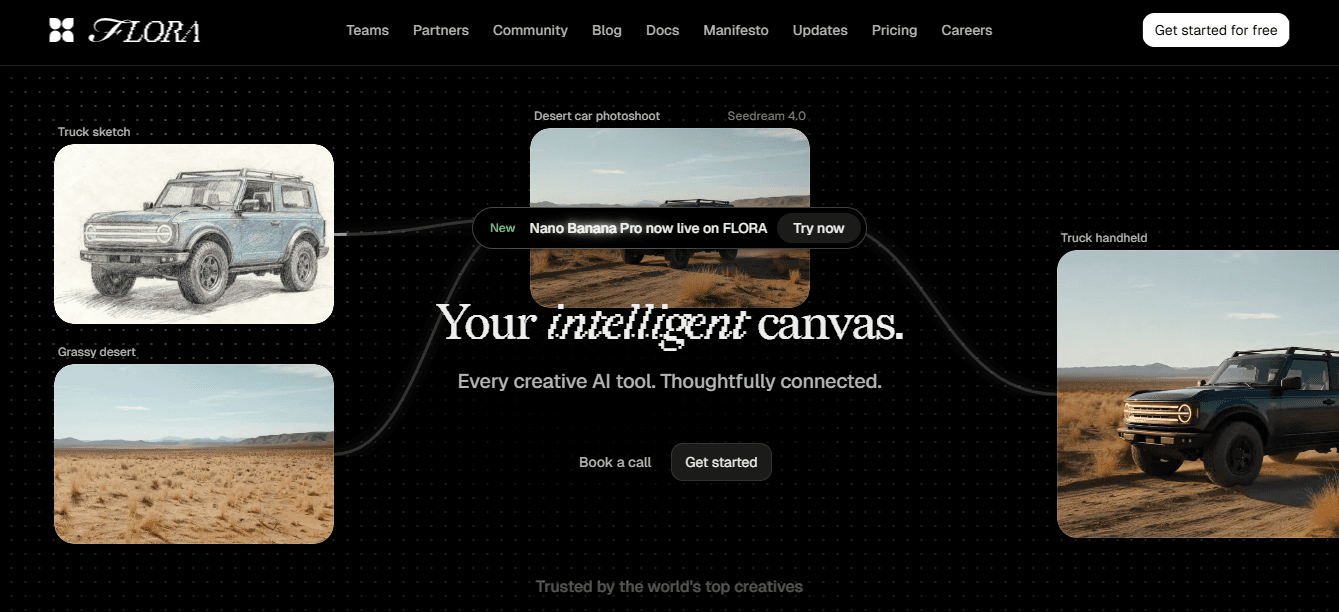
Flora AI is an AI-first canvas that seamlessly blends prompt-driven generation with live editing, allowing you to transition from a concept to multiple banner variants without switching apps. Use it when you want simultaneous image, text, and short-motion iterations in one place, or when the brief demands dozens of on-brand alternates for testing.
Single-Canvas Versioning Under Pressure
The real advantage becomes apparent under pressure: when stakeholders request five visual directions and a rapid style guide, Flora’s connected models and single-canvas versioning enable teams to create, lock brand layers, and export production-ready crops in parallel, rather than exporting and reconciling separate files. For teams concerned about inconsistent approvals, platforms like this compress review cycles by keeping comments and revisions attached to the asset itself, eliminating ambiguity and preventing designers from re-exporting the same variations.
2. Canva
Canva is the fastest route to a polished banner if you value templates and clear export presets. Think of it as the well-stocked workbench: drag-and-drop compositing, prebuilt type treatments, and simple resizing tools cut the time between idea and upload. Use Canva when non-designers need to ship a clean visual without a steep learning curve, or when the job is short-form campaign work that benefits from consistent templates. The tradeoff is control; you get fewer precise layout controls than a design system, so lock down color and typography presets early to keep brand fidelity across multiple exports.
3. Figma
Figma is the drafting table for teams that require precision and collaborative reviews. Use it when you need shared components, strict spacing systems, and pixel-perfect handoffs for developers. The strength here is live collaboration, allowing designers, product people, and moderators to resolve placement and hierarchy directly within the file, rather than through lengthy email threads. Suppose your project has multiple reviewers or requires repeated cropping for different breakpoints. In that case, Figma’s components and constraints save the tedious rework that often occurs when files are copied and edited manually. When exact spacing and consistent typographic rhythm are crucial, especially across multiple community banners, this tool prevents version drift that can waste time during rollout.
4. Kapwing
Kapwing is the fast editor for last-minute tweaks and simple video-to-static conversions. Use it when you need to trim, crop, add subtle motion, or extract a still from a short clip for a seasonal banner. Kapwing’s social-oriented presets and quick export flow are ideal for marketing teams who iterate daily and cannot wait for heavy design cycles. The constraint to note is fidelity: Kapwing moves quickly, but complex masking and precise type control are limited, so treat it as the final polishing tool rather than the place where you craft the initial concept.
5. Pixazo (AI Reddit Banner Maker)
Pixazo is a specialized generator designed to translate a few prompts into theme-matched banner layouts, making it a strong ideation partner. Use it when you want to prototype ten distinct visual tones and then pick the strongest direction for refinement. It accelerates creative sprints because you can generate variations that respect basic safe zones and then refine the chosen direction in a traditional editor. The limitation is the same one every rapid generator has: outputs need deliberate curation. Expect to spend some minutes aligning color temperature and microcopy after generation so the final art reads like it was made for your community, not an algorithmic average.
Which Tool Fits Which Constraint?
If speed and non-designer friendliness are essential, consider Canva or Kapwing. If team precision and developer handoff are critical, choose Figma. If you want rapid ideation that feeds into a single-file production pipeline, use Pixazo to generate directions and then iterate in a collaborative editor. If you need both ideation and production on one canvas, Flora AI sits between those poles, letting teams scale concept to dozens of final assets without juggling licenses and file formats.
A Quick Pattern You Can Rely On, Not a Rule
When the scope is small and time is tight, the simplest tool that produces an acceptable asset usually wins. As stakeholder count, asset volume, or platform diversity increases, the hidden cost of ad hoc exports grows: inconsistent crops, lost feedback, and repeated rework. That cost manifests as stalled launches and extra review cycles, which is why some teams transition from single-use tools to an integrated canvas as soon as they reach recurring campaigns.
Why Familiar Workflows Break at Scale
Status quo disruption: why the familiar workflow breaks at scale, and how Flora AI bridges it
Most teams coordinate banner work through a mix of exports, inbox threads, and ad hoc previews, because that method is familiar and requires no new platform training. That approach works at first, but as variants multiply and stakeholders add nuanced requests, feedback fragments, and designers spend hours reconciling conflicting changes. Teams find that solutions like Flora AI provide a single, generative canvas with locked brand layers and batch export capabilities, compressing review cycles from days to hours while maintaining a complete audit trail and consistent on-brand output.
Context That Matters When Choosing Tools
Design decisions for banners are not only visual, but also strategic, because your banner competes for attention on a platform that reaches huge audiences, and visibility choices scale differently depending on where you place your effort. According to OGTool, Reddit has 1.2 billion monthly unique visitors. Many designers also work from an oversized master to preserve edge detail on large displays, so creating a generous working canvas, such as 2560 x 768 pixels, often prevents quality loss when downsampling for exports.
A Practical Analogy to Pick a Tool Quickly
Think of your project like a short furniture job: Canva is the pre-assembled cabinet, Figma is the custom joinery shop, Kapwing is the finishing table, Pixazo is the rapid sketch pad, and Flora AI is the integrated design-build studio where sketches turn into production runs without leaving the same space.
Here’s the Single Most Useful Tactic We Apply
When starting any banner project, generate three scaled directions in your chosen tool, then lock one brand element and run a 48-hour member preview. That one constraint forces clarity, reduces rounds of conflicting feedback, and surfaces which visual signifier actually prompts people to join or engage. That tidy result looks final, but the real question you’ll face next is more consequential than swapping tools.
Try FLORA's AI-native Creative Canvas for Free Today
It can be exhausting to manage banner work across multiple apps. Consider FLORA’s AI playground, which centralizes ideation, real-time collaboration, and batch exports on a single canvas, allowing decisions to happen at the speed of thought. This approach is already gaining traction, with over 10,000 users trying FLORA's AI-native Creative Canvas and 90% reporting increased productivity after using the platform.


"/><stop offset="1" stop-color="rgba(15, 15, 15, 0)"/></linearGradient></defs><path d="M 899.729 124.429 L 931.177 124.429 L 931.177 108.467 L 946.905 108.467 L 946.905 44.616 L 884.001 44.616 L 884.001 92.504 L 868.274 92.504 L 868.274 124.429 L 852.554 124.429 L 852.554 140.392 L 836.826 140.392 L 836.826 156.355 L 852.554 156.355 L 852.554 172.317 L 836.826 172.317 L 836.826 204.242 L 821.098 204.242 L 821.098 236.168 L 852.554 236.168 L 852.554 252.129 L 758.2 252.129 L 758.2 236.167 L 789.65 236.167 L 789.65 204.241 L 805.378 204.241 L 805.378 172.316 L 821.098 172.316 L 821.098 124.428 L 836.826 124.428 L 836.826 92.504 L 852.554 92.504 L 852.554 44.616 L 836.826 44.616 L 836.826 28.654 L 962.625 28.654 L 962.625 44.616 L 978.353 44.616 L 978.353 60.579 L 994.081 60.579 L 994.081 76.541 L 978.353 76.541 L 978.353 124.429 L 946.905 124.429 L 946.905 140.392 L 931.177 140.392 L 931.177 156.355 L 946.905 156.355 L 946.905 236.168 L 978.417 236.168 L 978.417 220.205 L 994.145 220.205 L 994.145 204.242 L 1009.865 204.242 L 1009.865 188.28 L 1025.593 188.28 L 1025.593 204.242 L 1009.865 204.242 L 1009.865 220.205 L 994.145 220.205 L 994.145 236.168 L 1025.593 236.168 L 1025.593 252.13 L 915.449 252.13 L 915.449 156.355 L 899.729 156.355 Z M 1135.672 172.317 L 1119.944 172.317 L 1119.944 76.541 L 1104.216 76.541 L 1104.216 92.504 L 1088.496 92.504 L 1088.496 108.467 L 1072.768 108.467 L 1072.768 92.504 L 1088.496 92.504 L 1088.496 76.541 L 1104.216 76.541 L 1104.216 60.579 L 1119.944 60.579 L 1119.944 28.654 L 1135.672 28.654 L 1135.672 60.579 L 1151.392 60.579 L 1151.392 236.168 L 1167.12 236.168 L 1167.12 252.13 L 1104.216 252.13 L 1104.216 236.168 L 1119.944 236.168 L 1119.944 188.28 L 1135.672 188.28 Z M 1072.768 124.429 L 1072.768 140.392 L 1057.041 140.392 L 1057.041 156.355 L 1041.321 156.355 L 1041.321 172.317 L 1025.593 172.317 L 1025.593 156.355 L 1041.321 156.355 L 1041.321 140.392 L 1057.041 140.392 L 1057.041 124.429 Z M 176.61 25.988 C 124.406 25.988 78.864 38.954 68.867 80.108 C 64.424 102.095 70.533 130.282 105.522 145.504 C 107.678 146.379 109.332 146.83 110.516 147.152 C 112.382 147.661 113.082 147.852 112.742 148.886 C 112.186 150.577 106.633 150.014 102.19 148.323 C 69.424 136.484 51.65 107.168 54.983 77.289 C 60.536 35.572 109.966 -1.636 179.387 0.056 C 202.713 0.056 238.812 5.692 273.246 15.276 C 293.795 20.914 321.009 28.243 346.555 34.444 C 369.881 24.86 392.096 18.659 411.534 18.659 C 425.628 18.659 438.846 21.919 444.414 28.654 L 537.86 28.654 L 537.86 44.616 L 506.41 44.616 L 506.41 60.579 L 490.685 60.579 L 490.685 92.504 L 474.959 92.504 L 474.959 124.429 L 459.233 124.429 L 459.233 172.317 L 443.508 172.317 L 443.508 220.205 L 427.783 220.205 L 427.783 236.168 L 522.135 236.168 L 522.135 220.205 L 537.86 220.205 L 537.86 204.242 L 553.586 204.242 L 553.586 172.317 L 569.311 172.317 L 569.311 204.242 L 553.586 204.242 L 553.586 236.168 L 537.86 236.168 L 537.86 252.13 L 364.881 252.13 L 364.881 236.168 L 396.332 236.168 L 396.332 220.205 L 412.058 220.205 L 412.058 172.317 L 427.783 172.317 L 427.783 140.392 L 443.508 140.392 L 443.508 92.504 L 459.234 92.504 L 459.234 44.616 L 444.157 44.616 C 437.338 52.415 419.206 55.303 394.318 55.303 C 379.323 55.303 357.108 53.048 349.333 51.92 C 337.67 63.196 325.452 77.853 314.9 90.82 C 305.307 102.032 297.996 111.856 290.818 121.501 C 284.281 130.284 277.855 138.919 269.914 148.323 C 283.798 148.886 298.794 147.759 309.901 143.812 C 320.454 129.155 333.783 122.39 342.669 124.645 C 351.554 126.9 350.444 135.92 337.67 145.504 C 335.4 147.26 333.256 148.887 331.193 150.453 C 322.659 156.932 315.515 162.356 306.569 171.436 C 304.66 173.374 302.994 175.312 301.571 176.968 C 299.269 179.646 297.602 181.584 296.572 181.584 C 293.24 182.148 294.351 172 296.572 166.363 C 299.349 159.597 302.126 154.524 304.903 150.577 C 295.462 153.396 284.91 154.524 266.026 154.524 C 264.938 155.812 263.791 157.222 262.545 158.751 C 259.978 161.904 256.993 165.569 253.253 169.745 C 204.381 225.557 123.85 256 71.645 256 C 29.993 256 0 239.087 0 212.591 C 0 193.987 12.774 175.947 34.99 175.947 C 53.317 175.947 61.092 188.349 60.537 200.188 C 59.981 208.644 57.204 213.718 51.651 219.92 C 47.763 224.429 44.431 228.376 44.431 234.013 C 44.431 243.597 52.762 249.798 68.867 250.362 C 111.631 253.181 142.177 234.013 176.61 195.678 C 190.494 180.456 200.491 168.054 210.488 153.96 C 198.27 153.96 186.607 153.96 179.943 154.524 C 172.902 154.799 168.37 155.744 165.639 156.313 C 162.768 156.912 161.886 157.096 162.17 155.652 C 162.726 153.396 167.724 149.45 184.385 148.323 C 188.537 147.94 196.791 148.077 204.443 148.204 C 208.052 148.264 211.528 148.323 214.375 148.323 C 222.151 137.611 231.037 125.772 242.7 113.37 C 264.915 89.128 294.35 65.451 323.23 47.411 C 307.124 45.719 281.021 40.645 263.804 37.263 C 239.923 32.753 203.268 25.988 177.166 25.988 L 176.61 25.988 Z M 365.438 39.518 C 386.542 45.156 403.204 46.847 413.2 46.847 C 427.64 46.847 440.969 42.336 441.524 36.136 C 442.08 29.37 428.751 24.296 410.979 24.296 L 410.423 24.296 C 394.317 24.296 375.435 32.753 365.438 39.518 Z M 711.023 252.129 L 616.672 252.129 L 616.672 236.167 L 600.946 236.167 L 600.946 220.204 L 585.221 220.204 L 585.221 108.466 L 600.946 108.466 L 600.946 76.54 L 616.672 76.54 L 616.672 60.578 L 632.396 60.578 L 632.396 44.616 L 663.847 44.616 L 663.847 28.654 L 758.2 28.654 L 758.2 44.616 L 773.924 44.616 L 773.924 60.579 L 789.65 60.579 L 789.65 172.317 L 773.924 172.317 L 773.924 188.28 L 758.2 188.28 L 758.2 220.205 L 742.474 220.205 L 742.474 236.168 L 711.023 236.168 Z M 663.847 44.616 L 663.847 60.579 L 648.122 60.579 L 648.122 76.541 L 632.396 76.541 L 632.396 108.467 L 616.672 108.467 L 616.672 220.205 L 632.396 220.205 L 632.396 236.168 L 695.298 236.168 L 695.298 220.205 L 711.023 220.205 L 711.023 204.242 L 726.749 204.242 L 726.749 188.28 L 742.474 188.28 L 742.474 156.355 L 758.2 156.355 L 758.2 60.579 L 742.474 60.579 L 742.474 44.616 Z" fill="url(%23k7ftP17bN-2050371890-linear-gradient)" height="255.9995555606772px" id="k7ftP17bN" width="1167.1199228535695px"/></svg>)